Identify Any Record
by Photo
Centre the sleeve in the frame and take one picture. VinylBrain names the artist, the album, the label, the catalogue number and the pressing — and if you turn the disc over and shoot the dead wax, it reads the runout etching back to you verbatim.
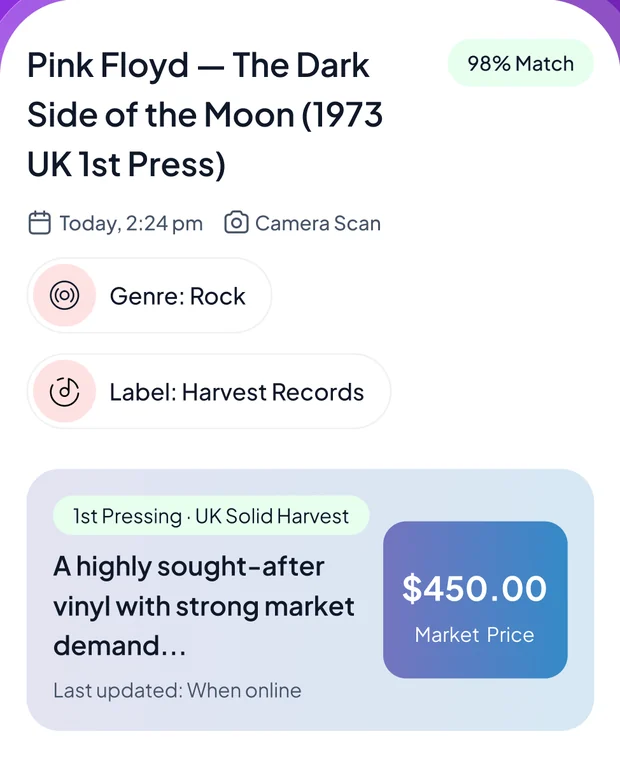
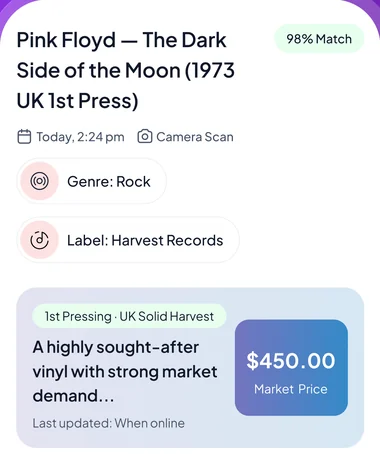
Same album. Wildly different record.
An original and a reissue can look identical in a sleeve and be nothing alike in a crate. VinylBrain asks the question the price depends on — and there is a fifth answer too, for coloured vinyl, picture discs and numbered editions.
Across every format and genre
- LP (33⅓)
- 12" Maxi Single
- 7" Single (45)
- 10" EP
- Box Set
- Rock
- Jazz
- Soul & Funk
- Electronic
- Hip Hop
- Classical
- Pop
- Latin
- Reggae
- Blues
- Folk, World & Country
- Stage & Screen
- Non-Music
Three steps, one record at a time
No squinting at a runout under a lamp with a discography open in another tab. Pull the record out and take the picture.
Photograph the record
Centre the sleeve in the square frame. Turn it over for the back, or point the camera at the dead wax near the label if the pressing is what you are after.
Read the pressing
Artist, album, label, catalogue number, year, genre and pressing edition, with a match confidence — plus the runout etching itself, transcribed exactly as it appears.
File it in a collection
Save it to a collection you named yourself, with its grade, market trend and last recorded sale alongside — and a running total for everything on the shelf.
More than an identifier — a collector's desk
Scanning is the front door. What keeps diggers in the app is everything that happens to the record afterwards.
Scan without a daily quota
No per-day allowance to ration across a crate you just bought at a car boot. There is a fair-use ceiling to keep the service up, but ordinary digging never reaches it.
It reads the dead wax
The runout etching between the last groove and the label is how a pressing is actually dated — the mastering stamps, the stamper codes, the plant marks. VinylBrain transcribes it verbatim rather than paraphrasing it away.
Pressing, not just title
Label, catalogue number, year, pressing edition and rarity, coloured-vinyl variant — the fields that separate an original from a repress.
Collections & value
Sort records into collections you name yourself and watch the total move as values change.
Ask VinylBrain
Sleeve missing, or no clean shot? Answer five questions — genre, format, pressing, decade and condition — and the catalogue narrows itself down.
Photo enhancer
Clean up a dim or glare-heavy shot before it goes to the identifier — useful on a glossy sleeve under a shop light.
Browse & search
Look a record up by name, or filter the catalogue by genre, and open the same detail page a scan gives you.
Scan history
Everything you have identified stays in recent scans — re-open a record without photographing it twice.
A low-confidence guess still says it is a guess
When the photo is blurry, cropped or badly lit the identifier returns its best candidates with the confidence marked down and the reason spelled out, rather than either inventing certainty or giving you nothing at all.
The answer is etched into the record
Between the run-out groove and the label there is a band of blank vinyl with marks scratched into it — matrix numbers, stamper codes, a mastering engineer's signature. It is the most reliable way to date a pressing, and almost nobody reads it, because you have to know what you are looking at.
-
Transcribed, not summarised The etching comes back verbatim, kept separate from the catalogue number.
-
Mastering stamps it knows by name Porky, Pecko, STERLING, Masterdisk — the signatures that pin down a cut.
-
Label variations and rim text The design details that date a pressing when the runout is worn.
-
Catalogue number, kept in its own field So the runout and the catalogue number never get confused for each other.
The sleeve and the disc are graded apart
Any dealer will tell you a VG+ sleeve around a VG disc is a different record from the reverse. The Goldmine standard grades them separately, and so does VinylBrain — alongside a read on whether the pressing is what it claims to be.
-
Up to four angles of one record Dead wax, centre label, sleeve or cover, and the disc surface.
-
Original, reissue or bootleg Judged on catalogue-number consistency across label, spine and cover.
-
The marks a bootleg gets wrong Rights-society stamps, pressing-plant identifiers, the barcode-era tell, print quality.
-
Goldmine, both halves Mint through Poor, applied separately to the sleeve and to the vinyl.
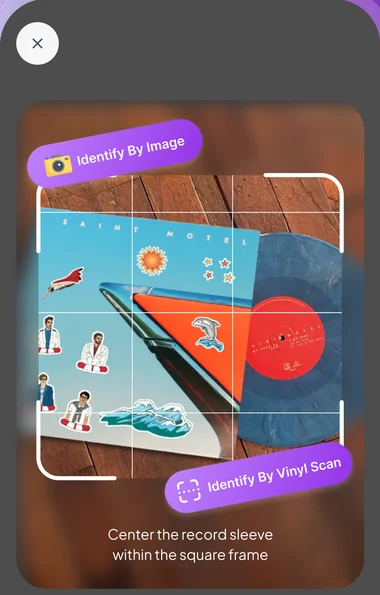
Straight from inside the app
Real screens: centre the sleeve, then read what came back.
Taken from the VinylBrain App Store screenshots. Record titles and figures shown are examples — what the app reports depends on the pressing and its condition.
What you get with VinylBrain
VinylBrain is a subscription app: the download is free, and full access comes with the subscription. Where your store offers an introductory free trial, the purchase screen shows it before you commit.
Start with the appPrice, any introductory offer and renewal terms are set by the App Store or Google Play and are shown on the purchase screen in your region before you buy. If a trial is offered it converts to a paid subscription unless you cancel beforehand, and you can cancel any time from your store subscription settings.
-
Record scans without a daily quota LP, 12-inch, 7-inch, 10-inch or box set.
-
Pressing identification Label, catalogue number, edition, and the runout etching.
-
Authenticate & Goldmine grading Four angles, sleeve and vinyl graded separately.
-
Collection tracker Collections and a running total for the whole shelf.
-
Ask VinylBrain Five questions when a photo will not do it.
Questions, answered
The things collectors ask us before they download.
Find out which pressing you actually own
Free to download. Pull the first record off the shelf, photograph the sleeve, then turn the disc over and read the dead wax.